My first year I taught using the traditional planbook. I'd essentially fill in a basic schedule, and a generic title for what I was teaching (i.e. "Sunken Ship, GLE 3.2" etc). I would do more extensive planning using a form I adapted from student teaching, laying out objectives and student/teacher actions. That process really didn't lend itself to being very reflective, since it was in a book that I really didn't want to flip back through (why flip backwards, when you can fill it going forwards?!).
During that year my district started using OneNote. Essentially: a binder with pages where you can use it as you would Word, but share it on a network with others. Pretty great for work done as a team, since each teammate can add, subtract, edit or view the document (assuming they are on the network). You create a section like you would in a regular binder, then create pages to fit in those sections. You can insert files, add links, pictures, to-do's, questions, notes etc. I really didn't start using it for my own practice until the summer when I thought it would be a great way for me to record my notes about books I was planning to use with kids in guided reading or literature circles. That gave me the brilliant idea of taking notes about on the various pieces of Units of Study for Writing... leading me into using it as my planbook.
I was excited about continuing that usage this year. My hope was to go back through the notes from the start of the year this week (since I actually made notes in the margins, and had to-do's in the plans- something I didn't do as much of with the pencil/paper version). Unfortunately I need to start from scratch this year. Why you ask? Because I had my computer re-imaged since our district is going to Windows 7! I pulled a ton of stuff off the desktop before summer, anticipating the re-imaging. But when I inquired about when laptops would be re-imaged I was told that they weren't planning to do anything with them until the fall. When I went in to do some curriculum work for technology this past week I was able to work my way into getting it updated (teacher desktops were done, but I don't have a desktop... I have a laptop!)... and hence lost the stuff I hadn't put on the network or my flash drive. Bummer.
Next time I'll tread more lightly instead of hastily jumping for joy that they were going to upgrade my laptop!
Showing posts with label OneNote. Show all posts
Showing posts with label OneNote. Show all posts
Sunday, August 21, 2011


Thursday, August 12, 2010
Changing the Way I Plan
I genuinely enjoy planning. It is a chance to decide how you'll get from A to Z, and what you'll see along the way. For me, planning has been about yellow legal pads where I can just write down whatever comes to my mind. The biggest problem with that is I often don't refer back to it, letting it sit and fade into the page.

Instead I am using OneNote to do my planning. I wasn't completely sold on the program at first, not really seeing how an electronic binder would help my instruction. But after a conversation with a colleague at my writing training last week, I decided to try planning using it. Why? I can refer back to my work (and not worry about which notebook it is in). I can make lists of what needs to be checked off and done, and I can embed my assessments directly into the document. So much easier! Below are two of the screenshots from my work thus far...

Towards the bottom I have the Writing GLE's so that I can open the document without having to search for them. Additionally I have placed images of the Writing Power Standards for our district, making it easier to view as I am planning (what standard does this relate to again?)

Above is an image from one of the units, particularly my launching the writing workshop section. I've taken the information from my Units of Study book and made it my own. Highlighted information is stuff I need to go back and fix as I go forward (what I am going to write about as I demo, etc).
Tuesday, August 10, 2010
Wax On, Wax Off
I made the trek to school today, a wonderful 25 minute jaunt because it wasn't rush hour. When I arrived I nearly had a heart attack. The floors were being waxed, common for this time of year in schools across the country. What in the world was I going to do? Thankfully my room opens to the outside, and the door was unlocked (courtesy of our janitor! so great!).
I was able to get quite a bit done today. When I left last week they were getting set to re-wax the tile area in my room, which needed to cure before I could move anything. That was all set, so I was able to scoot desks, tables and computers around. I moved our computers back to where they were, taping their Ethernet cords to the wall so that they are mildly inconspicuous. I unflipped the desks that were in a giant cluster, putting them into some approximation of what my classroom will look like. I was also able to return some of my instructional materials (teaching guides) that I won't need to look at in the next two weeks (at least not at home, as some of those are still in the home office). Novels were also moved on top of one of the bookcases, creating another shelf since a majority of them will sit there until used for my various novel studies.
What are the next steps? Getting the physical space looking good is a great start. Next is making notes about what content I will teach, and how I want to teach it. I also need to look at the sequence so that I am sure it makes sense. I'll make other adjustments once the year gets rolling, but you need to start somewhere.
I am using the tool which I am using for my novel study summaries, OneNote, for my curriculum planning. Instead of oodles of notebook paper that I won't refer back to, I have a document that I am excited to add and revise to. I am using a new OneNote document for each curricular area that I teach (Reading, Writing, Social Studies), with different tabs for expectations and units. Thus far I couldn't be happier.
I was able to get quite a bit done today. When I left last week they were getting set to re-wax the tile area in my room, which needed to cure before I could move anything. That was all set, so I was able to scoot desks, tables and computers around. I moved our computers back to where they were, taping their Ethernet cords to the wall so that they are mildly inconspicuous. I unflipped the desks that were in a giant cluster, putting them into some approximation of what my classroom will look like. I was also able to return some of my instructional materials (teaching guides) that I won't need to look at in the next two weeks (at least not at home, as some of those are still in the home office). Novels were also moved on top of one of the bookcases, creating another shelf since a majority of them will sit there until used for my various novel studies.
What are the next steps? Getting the physical space looking good is a great start. Next is making notes about what content I will teach, and how I want to teach it. I also need to look at the sequence so that I am sure it makes sense. I'll make other adjustments once the year gets rolling, but you need to start somewhere.
I am using the tool which I am using for my novel study summaries, OneNote, for my curriculum planning. Instead of oodles of notebook paper that I won't refer back to, I have a document that I am excited to add and revise to. I am using a new OneNote document for each curricular area that I teach (Reading, Writing, Social Studies), with different tabs for expectations and units. Thus far I couldn't be happier.
Saturday, August 7, 2010
Organize and Save
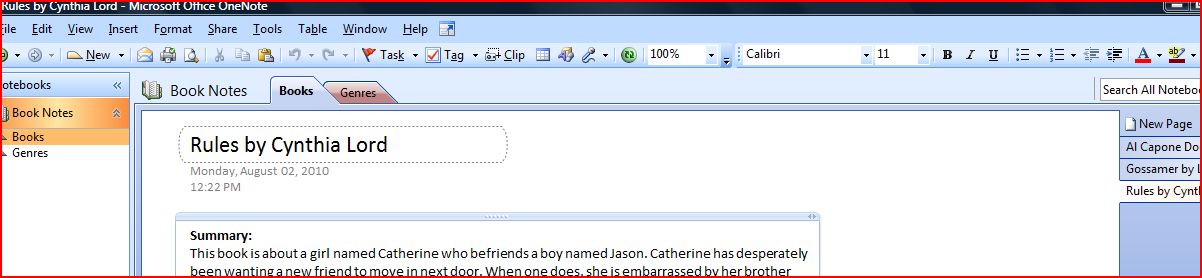 The image shows my personal experiment with OneNote. I have create a notebook with my novel study books. I knew that I wanted a place to write down summaries and questions that I could use in discussion groups or as reading response. I had previously thought about creating a Word document to store all of this information. The major problem with that is ensuring it isn't cumbersome. I want to be sure that I can go back and refer to my notes, even if I don't utilize the questions I have written down. My hope is that it will save a little bit of my planning time. You'll never guess the trouble of ensuring you've read all 4-5 books in your novel study, while also being sure you've got all of your other reading (instructional materials, social studies, current events) taken care of!
In the future I think I will include tabs for different book groups, grouped by genre or category. I've started a Genre tab, but it falls short in some of the sorting capabilities that Excel has. I have a different document in Excel that has all of my multiple copy books (or most... well, many). I can sort it by title, author, number of copies, or approximate reading level. It isn't perfect, but it definitely helps out with some of my planning.
Monday, August 2, 2010
Back on the Horse
This afternoon I walked into a local Starbucks in search of a little pick-me-up. I encountered a former co-worker (I was a barista while I was in my t-cert program), and we exchanged hellos, how are yous, and whatnots. He asked what I was doing today, to which I replied, "I spent the morning in my classroom, about 3 1/2 hours or so." He replied, with his face one of puzzlement, "What, are you teaching summer school or something?"
While I have certainly enjoyed a relaxing summer, I've started the process of getting back on the horse. I had a few simple tasks today:
While I have certainly enjoyed a relaxing summer, I've started the process of getting back on the horse. I had a few simple tasks today:
- Take old, tattered, expired books off the shelves to make way for newer books.
- Check to see if school laptop worked better at school than home (startup issues)
- Move some charts and maps from the wall in my search for a better way to utilize wall space
- Look for assessment guide, in particular leveled passages to assess fluency & comprehension.
What I ended up doing, taking up more time than the above items, was documenting some of the books I've been reading this summer. This past year my school district used some of our technology stipend on learning Microsoft's OneNote. In a nutshell, OneNote is a digital binder. We use it for documenting our staff development, and team meetings. I've also used it to document my work with students in reading, using different tabs for each rotation of kids that I would see and placing pages in each tab with the date for my reading conferences. Kids would read while I was script on my laptop, typing notes about fluency or comprehension including areas of growth/struggle.
I decided to employ this for the books I've been reading. Ever read a book, dog ear a page, then wonder what the heck you did that for (when you look back days, weeks, months later?)? Well I haven't totally determined my organizational structure yet, but I have a few pages on different books. I included a brief 2-3 paragraph summary. After that I included page numbers with quotes and questions, things that I might use when I use these books again. While I might not use the questions that I've noted, at least I have a head start the next time I go back to use these books.
I was in my classroom today? Yes I was, and it was good to be back on the horse.
Subscribe to:
Posts (Atom)